Lightweight framework to capture and display team sentiment.

Genchi shows real-time project status by combining a two-second pulse check from every team member, tracked over time to highlight how overall progress is trending.

The wisdom of crowds, applied to project status.

See how a comprehensive, always-current view of your portfolio is built from regular, individual check-ins.

Slack Check-In

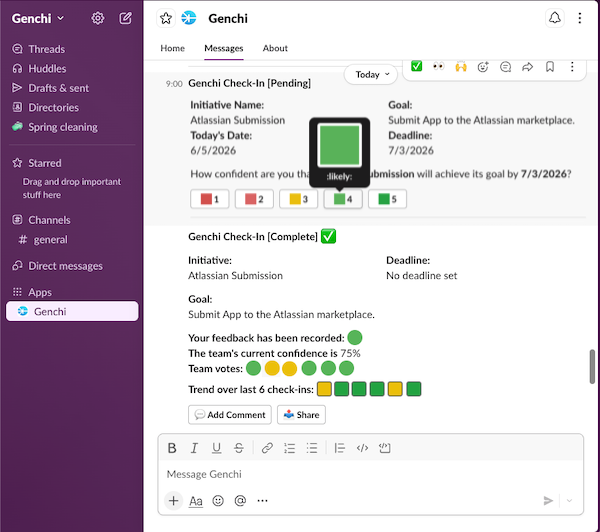
It starts with a two-second check-in.

Every data point in Genchi begins here — a response to a prompt in Slack, email, or the app.

Slack Check-In
  • A single question. Every check-in asks the team member: "How confident are you that we'll achieve our goal?" — answered on a 1–5 scale.
  • Optional comment. The team member can add a short note to add context or flag a blocker.
  • Cadence you choose. Set the rhythm per initiative — daily, weekly, or whatever fits the team.

It builds into a team-level picture.

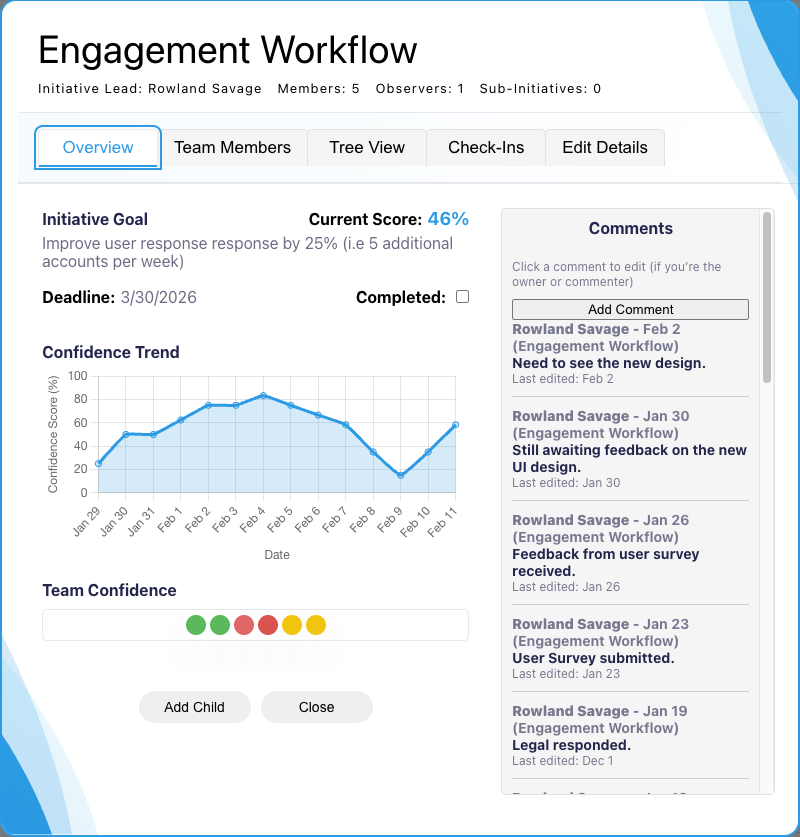
Individual check-ins for an initiative are combined and color-coded into a current view of the whole team's sentiment.

Initiative Modal
  • Visible, but anonymous. The most recent individual vote values are shown — you can see when one person is seeing something the others aren't. Who voted what stays private to encourage honesty.
  • The trend over time. The team's sentiment isn't just a snapshot — it's tracked so you can see how the team's confidence changes over time.
  • Comments curated by initiative. Optional comments and blockers provide qualitative context and additional insight beyond the vote scores.
Initiative Modal
Portfolio View

It scales to the full portfolio.

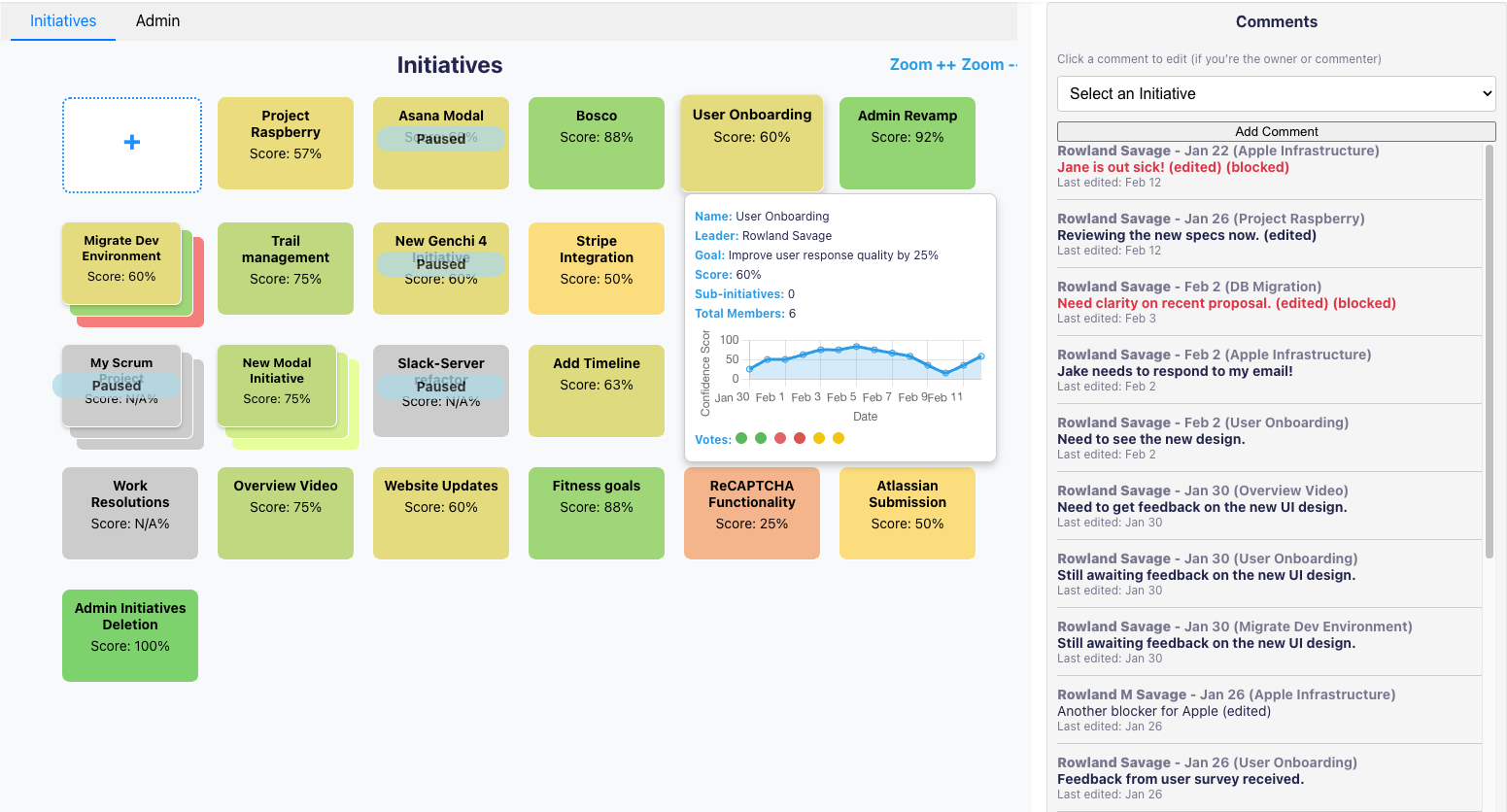
From one team to 100 — your full portfolio, color-coded and current, at a glance.

Portfolio View
  • Problems stand out at a glance. Color-coding makes troubled teams immediately visible — no scanning required.
  • Hierarchy as needed. Initiatives can be grouped using a simple parent-child relationship — double-click any parent card to reveal the project structure beneath it.
  • Drill in for the full story. Click into any team to see the individual votes, the trend, and the comments behind the score.

What you need to know before you start.

The practical stuff — setup, integrations, roles, and pricing.

Setup

Live in under an hour.

Self-serve sign-up, no sales call. Connect to your Slack workspace, create your first initiative, invite your team. Your first check-in goes out tomorrow.

🔌

Integrations

Lives where your team already works.

Slack makes check-ins frictionless. Email and in-app options also available. Integrations with Jira and Asana to download initiative details. Atlassian and Google SSO.

See all integrations →
👥

Roles

Flexible implementation to fit your team.

Four roles. Each initiative has an Owner (usually the team leader) and Team Members who check in regularly. Observers can view progress for each initiative they're added to but cannot vote. Admins manage setup, user permissions, and billing.

💰

Pricing

Free for small teams. Cheap after that.

Free for teams under 10. Less than $1 per user per month above that. No credit card to start. 14-day free trial — long enough to see real check-in data from your team.

See pricing →

See what your teams are thinking. Two seconds per person.

Many organizations strive for transparency. Genchi gives you a way to actually implement it.

START FREE TRIAL

Free for teams <10. <$1/user/month after that. No credit card to start, no setup fee.